
Sigurna kupovina

Brza isporuka

Click&Collect

Podrška
Slični proizvodi
Kako biste ocenili ovaj proizvod na skali od 1 do 5?
Imate pitanje?
Postavite pitanje i dobićete odgovor brzo.
Identify and automate software update patches, ensuring your applications are always up to date.
Patches are software and operating system updates that address security vulnerabilities within an application. Software vendors constantly release patches to fix vulnerabilities and provide enhanced security features. Patching can be complex and time consuming, but ignoring software updates isn’t an option.
If patches are not installed in a timely manner, networks can be severely compromised. Patch Management solves these issues by making it easy to identify and deploy critical patches, and monitor ongoing activity from a central cloud management console.

Schedule automatic patch scans. Select from daily, weekly or monthly options.

Patches will be deployed automatically for all software applications. You can easily exclude any application that you don’t want patched.

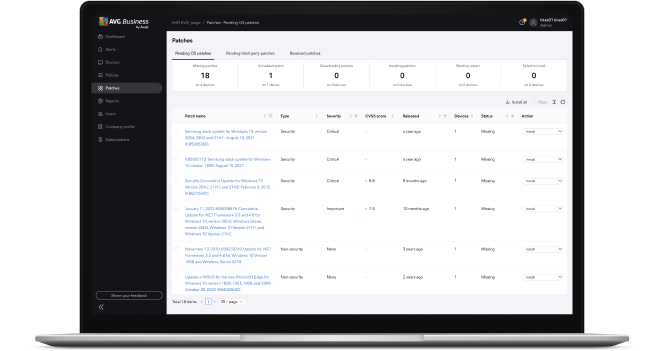
Easily see the status of all your patches, including missing patches and severity level.

Patches are typically created in response to security vulnerabilities and other software issues. By ensuring that devices are updated, your business will be less open to security threats and running on the most stable software versions available.
Windows patch management automates this process to ensure your system is kept up-to-date and that every device is running the latest software.

Applying patches regularly will ensure your company network is protected from known security vulnerabilities.

Applying updates to every endpoint on a network can be time-consuming. If users are responsible for updating their own devices, this could result in significant cumulative downtime. Patch management software automates this process and can ensure that systems are updated outside of peak working hours.

Knowing that endpoints have been patched makes sure that your business is adhering to regulatory measures and operating to expected industry standards.

As well as patching vulnerabilities, updates can provide improvements to software features and functionality, allowing your organization to work with the best version of the tools available.

Scanning for and implementing missing patches should be scheduled for times when they will cause the least disruption for staff.

Many companies will release patches at a set time each week or month. While these should be implemented swiftly, priority should be given to critical system patches that are issued to fix urgent security vulnerabilities.

Sometimes patches can cause compatibility issues with existing software. Keeping backups allows for rollbacks should an issue occur, minimizing the risk of downtime.
Patch management should be used in conjunction with antivirus, malware, and vulnerability scanners as part of a holistic security strategy to ensure that endpoints remain protected from threats.

Flexible deployment schedules
Schedule and deploy approved patches at desired times, or manually deploy to groups or individual devices.
Customizable patches
Choose software vendors, products, and the severity of patches to scan and install. Easily create exclusions for applications.
Update Agent capabilities
Download all missing patches to a Update Agent (selected device) that seamlessly distributes patches to all managed devices in the network.
Automatic scans
Schedule patch scans to run automatically either daily, weekly, or monthly at the desired Start time. Flexible deployment schedules can be used to manage missing patches.
Intuitive dashboard
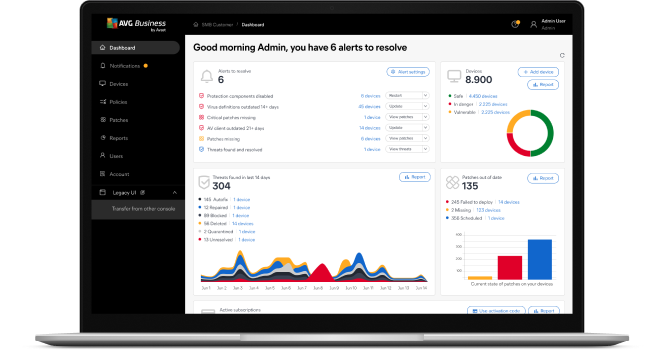
Manage all software patches and view graphical summaries of installed, missing, or failed patches from any device.
Thousands of patches
Deploy patches for Windows operating systems and thousands of third-party software applications for comprehensive protection.
Patch scan results
View detailed results from a single platform that includes information on missing patches, severity levels, knowledge base links, release dates, descriptions, and more.
Manage your AVG endpoint protection solutions from one central platform. Patch Management can only be managed from the console.
Learn more about the Management Console
 30-day money-back guarantee
Our patch selection includes thousands of compatible applications such as Windows operating systems and other third-party software, such as Zoom, Adobe Acrobat, Salesforce, and Dropbox.
Download the full list